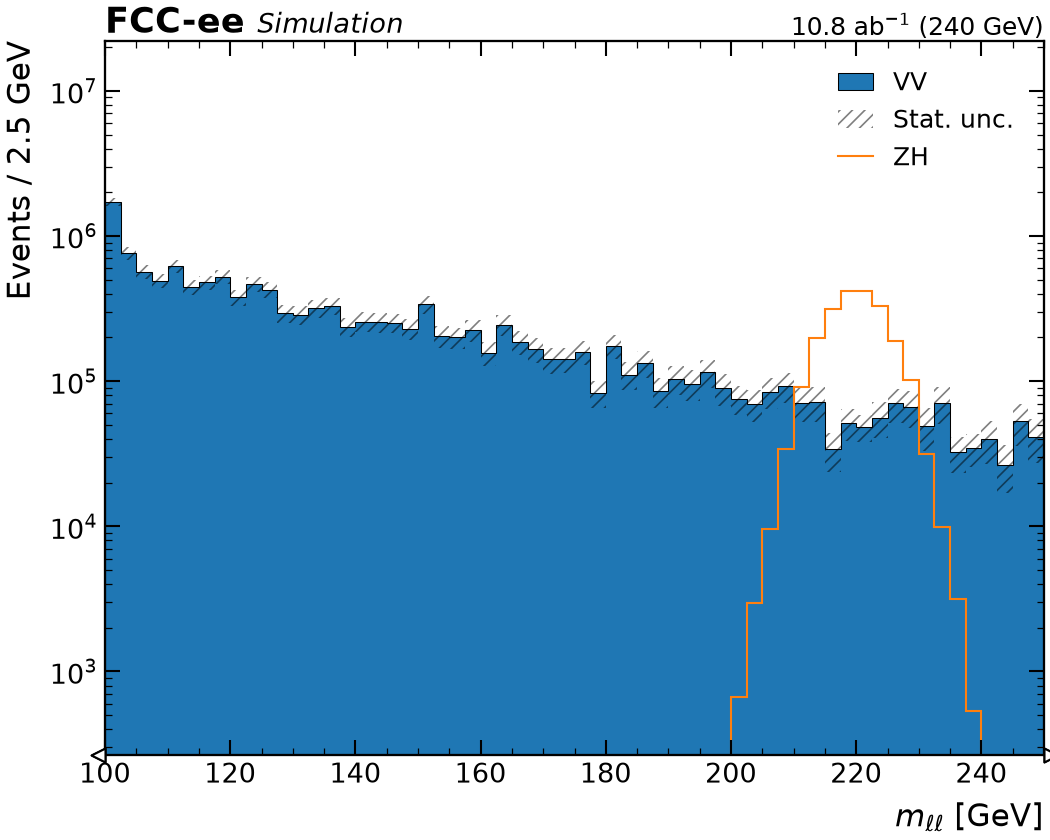
Histograms from an analysis framework: grouped, cropped and stacked
Files of ready-made histograms, one per process, are plotted by naming the histogram
where a branch would go. A Group sums WW and ZZ into one category. The Variable
merges the fine stored bins and crops the axis to 100-250 GeV
exactly as it would bin a tree, moving the rest into the flow bins, and stack=["VV"]
stacks the background with the ZH signal drawn over it.
import rootfig as rf

ww = rf.Sample("p8_ee_WW_ecm240.root", label="WW")
zz = rf.Sample("p8_ee_ZZ_ecm240.root", label="ZZ")
zh = rf.Sample("p8_ee_ZH_ecm240.root", label="ZH")
mll = rf.Variable("m_ll", bins=(60, 100, 250), label=r"$m_{\ell\ell}$", unit="GeV")
rf.plot(
    [rf.Group([ww, zz], label="VV"), zh],
    mll,
    stack=["VV"],
    logy=True,
    style=rf.Style(experiment="FCC-ee", status="Simulation", com="240 GeV", lumi="10.8 ab^-1"),
)
Setup
The code reads the toy dataset. In a checkout of rootfig, python examples/gallery writes it to examples/out/ in a few seconds; run the code inside that directory.